
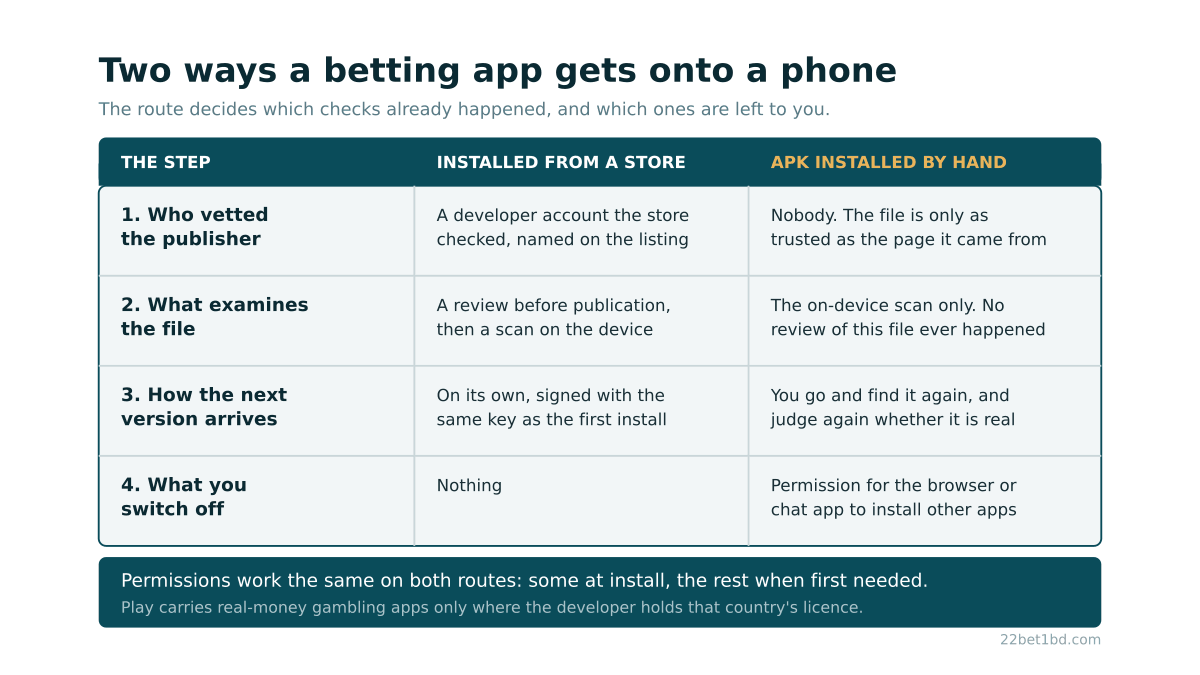
There is no single safest sports betting app, and the pages that name one are ranking brands by their offers rather than by anything about the software. What can actually be judged is the install: which route the file took onto the phone, who checked it along the way, and what the app asks to reach once it is running. Those three things are inspectable in a few minutes, and they differ far more between two install routes than between two operators.
Why do betting apps in Bangladesh usually arrive as an APK file?
Because the large app stores will not carry them, and the reason is a licensing condition no operator can satisfy here.
Google's own policy states that Play generally prohibits apps that facilitate real-money gambling, and allows them in select countries only, after an application to Google, from developers registered as a licensed operator with the appropriate governmental gambling authority in the specified country who also provide a valid operating licence for that country. Every word of that condition points at a national regulator. Bangladesh does not have one, because it has no domestic licensing regime for online gambling at all, which is the same fact underneath what the law actually says about betting in Bangladesh.
So the store route closes, and the file comes from the operator's own website instead. Two things follow from that, and they pull in opposite directions. The absence from the store is not a verdict on the operator: it is a jurisdiction rule, and it would shut out a scrupulous company and a careless one identically. But every check the store would have performed is now unperformed, and the person holding the phone is the only one left to perform it.
What is the safest sports betting app: the store version or the file you download?
Asked that way the question has an answer. The store route takes work off you; the downloaded file hands all of it back.
Four differences do the work, and none of them is about the app's features:
Who vetted the publisher. A store listing is bound to a developer account the store checked, and the company name on that listing is a claim someone is accountable for. A file sitting on a web page is bound to nothing except that page.
What examined the file. Store apps are reviewed before publication and scanned again on the device. A downloaded APK gets the on-device scan and nothing else, because no review of that specific file ever happened.
How the next version arrives. Store updates install themselves, and Android will only accept an update signed with the same key as the version already installed. That rule turns the update channel into a continuous identity check. With a hand-installed file you repeat the original judgement every time, from scratch.
What you switch off. Nothing, in the first case. In the second, you grant an app the power to install other apps, which is a permission Android deliberately does not give out by default.
The route, not the brand, is where most of the difference sits. The operator's app page sets out what the Android install involves, and the checks that apply to the website behind it are a separate exercise covered in how to check a betting site before trusting it.
Which betting app is safe to install, if sideloading is the only route?
No app is made safe by the way it is installed, but almost all of the avoidable risk sits in four decisions you control.
- Reach the download page by typing the operator's domain yourself. Not from a link in a message, not from an advert, not from a video description. A fake file does not have to be found to reach you; it is sent, wrapped in a link that resembles the real address closely enough to survive a glance.
- Grant the install permission to one app only. Android handles this through what its documentation calls special permissions, listed under special app access in settings. Give it to the browser you are downloading with, and to nothing else, least of all a chat app.
- Watch the first minute after installing. The requests an app makes on first launch are the clearest statement it will ever make about what it intends to touch.
- Remember where the file came from. The next version has to come from the same place, and an update offered from anywhere else is not an update.
Where an operator such as 22Bet distributes its Android file from its own domain, the site check and the file check collapse into one: whatever you established about the domain is the whole of what you know about the file. That is a real convenience and also a real single point of failure, which is why the first of these four steps carries the rest.
Is it safe for a betting app to have your social, contacts or SMS?
Those are three different questions, and Android's permission model answers them differently. The platform sorts permissions into install-time, runtime and special: install-time permissions are granted automatically when the app is installed, runtime permissions (the documentation also calls them dangerous permissions) prompt you the first time the app needs them, and special permissions cover particularly powerful actions and live in their own settings screen.
That grading is the useful part, because it tells you which permissions an app already has without ever asking.
SMS is the one worth pausing on. A betting app has a genuine reason to want it, namely reading a login code so you do not have to type it. It is also the channel your bank and your mobile wallet use for their own codes, and an app that can read one message can read all of them. Declining it costs you the time it takes to copy a code by hand.
Contacts has no betting function behind it. Referral features need it, and a referral feature is marketing rather than betting.
Signing in with a social account is a different mechanism altogether and often gets lumped in wrongly. It gives the app no access to your phone. It gives the operator whatever the social network's consent screen lists, which is displayed at the moment you approve it and is easy to accept unread, because it stands between you and the account you were trying to open.
All of this stays reversible. Runtime permissions can be withdrawn from settings after install, and withdrawing one uninstalls nothing: the feature that depended on it simply stops working, which is a decent way of finding out what it was for.
How do you tell the app's publisher is really the operator?
On a store listing you read the developer name and check it against the company named in the operator's terms and licence details. Without a listing, that check has nowhere to live, so it moves earlier in the process, to the path you took to reach the file.
The app name and the icon are the two things an impostor copies first, and copying them costs nothing. The signing key is the identity that cannot be faked, but Android exposes it to you only indirectly, by refusing an update signed with a different key. So the first install carries all the risk, and every later one only has to match it. An installer that arrives as a chat attachment is not the operator's file until the operator's own domain says it is.
What should you do if an app or a site turns out to be fake?
Report it, then contain it. Bangladesh's government incident response team, BGD e-GOV CIRT, receives incident reports and publishes advisories, and a fraudulent app aimed at Bangladeshi users is squarely the kind of thing it exists to collect.
Containing it means treating every credential typed into that app as exposed: change the same password anywhere else it was used, and change the wallet PIN if it was ever entered. Removing the app stops it collecting more, but it does not retrieve what already left.
None of this makes betting itself lawful in Bangladesh. A carefully installed app is still an app for an activity the Gambling Prevention Act 2026 covers, and the answers to the questions readers ask most often set out where that leaves a person who bets. Betting is for adults over 18, staked money should be treated as money you will not see again, and if stopping has stopped feeling like a decision you are making, the install method is not the problem worth solving.
Frequently asked questions
Can you use the mobile site instead of installing anything?
Yes, and it removes this whole category of risk rather than reducing it. A page in a browser holds no install-time permissions, stops when you close the tab, and leaves nothing behind that needs updating. What you give up is push notifications and anything that has to work without a connection.
Does switching "install unknown apps" back off remove the app?
No. That permission governs future installs by the app holding it, not apps already on the phone. Switching it off afterwards leaves the betting app running exactly as before and closes the door behind it, which is why Android made it per-app rather than one device-wide setting. The one thing it changes is that the next update will not install until you grant it again, and that prompt is worth having: it is the moment you get to ask where this file came from.
Is an iPhone automatically safer for this?
Safer for this specific risk, but not automatically. iOS has no equivalent of the switch that lets a browser install an app, so outside the App Store there is no ordinary way to put a file on the phone. What exists instead is a different route: an operator with no App Store listing may offer an install that first asks you to accept a configuration profile in settings, and that prompt deserves the same question as the Android one, namely whose domain served it and whether you reached that domain by typing the address yourself. The flip side is that an absent iOS app tells you nothing about the operator, since that store applies its own regional restrictions to real-money gambling, so a missing app is as likely to mean a closed jurisdiction as a problem with the company.